SEISPHONE

Tutorials | Technology | Hard-Reset | Windows | Apps | Software

Friday, February 9, 2018

AOKP Stock Rom for Samsung Galaxy Grand Duos I9082

AOKP Stock Rom for Samsung Galaxy Grand Duos I9082

AOKP (Android Open Kang Project) is one of the fastest ROMs available for Samsung Galaxy Grand Duos I9082 smartphone. The main feature of AOKP Rom is that it is based on Android 4.2.2 and consumes very less RAM.


Features of AOKP Rom for Galaxy Grand Duos I9082

Android 4.2.2

AOKP is based on the latest version of Android 4.2.2 which makes your phone much faster and smoother than the Samsung Stock Rom.

AOKP Ribbon

Ribbon allows you to quick access your favorite applications on the phone by swiping from the corner of the screen. It also allows to directly access the installed applications on the phone without opening the Launcher.

180 Degree rotation

Samsung Stock ROM only supports 90 decree of screen rotation whereas AOKP rom supports 180 degree of screen rotation.

Vibration Patterns

AOKP Rom allows you to make custom vibration patterns of your choice, making it easier to know who is calling when your phone is in silent or general mode.

Custom Toggles

By default Samsung Stock ROM displays toggles in the notification menu, but it does not allows you to change the toggles with your own custom toggles. Whereas AOKP Rom comes with the feature to customize the Notifications Toggles buttons.

Download AOKP Rom for Samsung Galaxy Grand Duos I9082

In case you like the above features of AOKP Rom and want to give it a try on your Galaxy Grand Duos then use the below link to download this ROM:

 DOWNLOAD AOKP Rom for Samsung Galaxy Grand Duos

More Galaxy Grand Duos Custom Rom


Readme Once:

[*] Working Features: Outgoing and Incoming calls, Outgoing and Incoming Messages, WI-FI, Bluetooth.

[*] Not Working: Low Call volume, Network Settings, Sound and Video recording, USB tethering.

[*] If you want to Root your Galaxy Grand then read Root Galaxy Grand Duos I9082.

[*] Samsung Stock Firmware: If you are looking for the original firmware for your device then head over to Download Samsung Stock Firmware for all devices page.

[*] Samsung USB Driver: If you are looking for the original USB Driver for your device then head over to Download Samsung USB Driver for all devices page.

[*] Credits: AOKP Rom for Samsung Galaxy Grand Duos is developed by K2wl (xda developer). So full credits for Rom goes to him.

Share:

Monday, January 22, 2018

By Country Name stock Rom Samsung Galaxy Grand Duos I9082

By Country Name stock Rom Samsung Galaxy Grand Duos I9082

Samsung Galaxy Grand DuosIn this page we have shared the original firmware (Stock ROM) for Samsung Galaxy Grand Duos (I9082) for all countries.


In case you are searching for the original firmware for Galaxy Grand Duos I9082 then this page might be helpful to you all.

Galaxy Grand Duos I9082 Stock Rom for Afghanistan

Afghanistan Model: GT-I9082
Country: Afghanistan
Version: Android 4.1.2
Changelist: N/A
Build date: N/A
Product Code: AFG
PDA: I9082XXAMC7
CSC: I9082OJVAMC1
password:firmwarefile.com
MODEM: I9082XXAMC4

DOWNLOAD LINK 

Galaxy Grand Duos I9082 Stock Rom for Algeria

Algeria Model: GT-I9082
Country: Algeria
Version: Android 4.1.2
Changelist: N/A
Build date: N/A
Product Code: TMC
PDA: I9082XXAMD1
CSC: I9082OJVAMD1
MODEM: I9082XXAMD1

DOWNLOAD LINK 

Galaxy Grand Duos I9082 Stock Rom for Baltic

Baltic Model: GT-I9082
Country: Baltic
Version: Android 4.1.2
Changelist: N/A
Build date: N/A
Product Code: SEB
PDA: I9082XXAME1
CSC: I9082OXXAME1
MODEM: I9082XXAME1

DOWNLOAD LINK 

Galaxy Grand Duos I9082 Stock Rom for Bangladesh

Bangladesh Model: GT-I9082
Country: Bangladesh
Version: Android 4.1.2
Changelist: 1170506
Build date: Wed, 05 Jun 2013 11:04:34 +0000
Product Code: TML
PDA: I9082XXAMF2
CSC: I9082ODDMF4
MODEM: I9082XXAME4

DOWNLOAD LINK 

Galaxy Grand Duos I9082 Stock Rom for Bulgaria

Bulgaria Model: GT-I9082
Country: Bulgaria
Version: Android 4.1.2
Changelist: N/A
Build date: N/A
Product Code: BGL
PDA: I9082XXAME1
CSC: I9082OXXAME1
MODEM: I9082XXAME1

DOWNLOAD LINK 

Model: GT-I9082
Country: Bulgaria (VVT)
Version: Android 4.1.2
Changelist: N/A
Build date: N/A
Product Code: VVT
PDA: I9082XXAME1
CSC: I9082VVTAMD1
MODEM: I9082XXAME1

DOWNLOAD LINK 

Galaxy Grand Duos I9082 Stock Rom for China

China Model: GT-I9082
Country: China
Version: Android 4.1.2
Changelist: 1329072
Build date: Tue, 30 Jul 2013 01:13:18 +0000
Product Code: CHU
PDA: I9082ZNANC1
CSC: I9082CHUANC1

DOWNLOAD LINK 

Samsung Galaxy Grand Duos I9082 Stock Rom for Egypt

Egypt Model: GT-I9082
Country: Egypt
Version: Android 4.1.2
Changelist: N/A
Build date: N/A
Product Code: EGY
PDA: I9082XXAMC7
CSC: I9082OJVAMC1
MODEM: I9082XXAMC4

DOWNLOAD LINK 

Galaxy Grand Duos I9082 Stock Rom for Germany

Germany Model: GT-I9082
Country: Germany
Version: Android 4.1.2
Changelist: N/A
Build date: N/A
Product Code: DBT
PDA: I9082XXAMAC
CSC: I9082OXXAMA5
MODEM: I9082XXAMA9

DOWNLOAD LINK 

Galaxy Grand Duos I9082 Stock Rom for Greece

Greece Model: GT-I9082
Country: Greece
Version: Android 4.1.2
Changelist: N/A
Build date: N/A
Product Code: EUR
PDA: I9082XXAME1
CSC: I9082OXXAME1
MODEM: I9082XXAME1

DOWNLOAD LINK 

Samsung Galaxy Grand Duos I9082 Stock Rom for India

India Model: GT-I9082
Country: India
Version: Android 4.1.2
Changelist: 1262039
Build date: Thu, 13 Jun 2013 11:21:40 +0000
Product Code: INU
PDA: I9082XXAMF7
CSC: I9082ODDMF3
MODEM: I9082XXAME4

DOWNLOAD LINK 

Model: GT-I9082
Country: India
Version: Android 4.1.2
Changelist: 1262039
Build date: Thu, 13 Jun 2013 11:21:40 +0000
Product Code: INS
PDA: I9082XXAMF7
CSC: I9082ODDMF3
MODEM: I9082XXAME4

DOWNLOAD LINK 

Galaxy Grand Duos I9082 Stock Rom for Indonesia

Indonesia Model: GT-I9082
Country: Indonesia
Version: Android 4.1.2
Changelist: 1243530
Build date: Tue, 11 Jun 2013 10:10:10 +0000
Product Code: XSE
PDA: I9082XXAMF5
CSC: I9082OLBAMF1
MODEM: I9082XXAME2

DOWNLOAD LINK 

Samsung Galaxy Grand Duos I9082 Stock Rom for Iran

Iran Model: GT-I9082
Country: Iran
Version: Android 4.1.2
Changelist: N/A
Build date: N/A
Product Code: THR
PDA: I9082XXAMC7
CSC: I9082OJVAMC1
MODEM: I9082XXAMC4

DOWNLOAD LINK 

Samsung Galaxy Grand Duos I9082 Stock Rom for Iraq

Iraq Model: GT-I9082
Country: Iraq
Version: Android 4.1.2
Changelist: N/A
Build date: N/A
Product Code: MID
PDA: I9082XXAMC7
CSC: I9082OJVAMC1
MODEM: I9082XXAMC4

DOWNLOAD LINK 

Galaxy Grand Duos I9082 Stock Rom for Kazakhstan

Kazakhstan Model: GT-I9082
Country: Kazakhstan
Version: Android 4.1.2
Changelist: N/A
Build date: N/A
Product Code: SKZ
PDA: I9082XXAMC7
CSC: I9082OXEAMB1
MODEM: I9082XXAMC4

DOWNLOAD LINK 

Samsung Galaxy Grand Duos I9082 Stock Rom for Kenya

Kenya Model: GT-I9082
Country: Kenya
Version: Android 4.1.2
Changelist: N/A
Build date: N/A
Product Code: AFR
PDA: I9082XXAMC7
CSC: I9082OJVAMC1
MODEM: I9082XXAMC4

DOWNLOAD LINK 

Galaxy Grand Duos I9082 Stock Rom for Malaysia

Malaysia Model: GT-I9082
Country: Malaysia
Version: Android 4.1.2
Changelist: 1243530
Build date: Tue, 11 Jun 2013 10:10:10 +0000
Product Code: XME
PDA: I9082XXAMF5
CSC: I9082OLBAMF1
MODEM: I9082XXAME2

DOWNLOAD LINK 

Galaxy Grand Duos I9082 Stock Rom for Mauritania

Mauritania Model: GT-I9082
Country: Mauritania
Version: Android 4.1.2
Changelist: N/A
Build date: N/A
Product Code: MRT
PDA: I9082XXAMC7
CSC: I9082OJVAMC1
MODEM: I9082XXAMC4

DOWNLOAD LINK 

Galaxy Grand Duos I9082 Stock Rom for Morocco

Morocco Model: GT-I9082
Country: Morocco (MWD)
Version: Android 4.1.2
Changelist: N/A
Build date: N/A
Product Code: MWD
PDA: I9082XXAMC7
CSC: I9082OJVAMC1
MODEM: I9082XXAMC4

DOWNLOAD LINK 

Galaxy Grand Duos I9082 Stock Rom for Nepal

Nepal Model: GT-I9082
Country: Nepal
Version: Android 4.1.2
Changelist: 1170506
Build date: Wed, 05 Jun 2013 11:04:34 +0000
Product Code: NPL
PDA: I9082XXAMF2
CSC: I9082ODDMF2
MODEM: I9082XXAME4

DOWNLOAD LINK 

Galaxy Grand Duos I9082 Stock Rom for Nigeria

Nigeria Model: GT-I9082
Country: Nigeria
Version: Android 4.1.2
Changelist: N/A
Build date: N/A
Product Code: ECT
PDA: I9082XXAMC7
CSC: I9082OJVAMC1
MODEM: I9082XXAMC4

DOWNLOAD LINK 

Galaxy Grand Duos I9082 Stock Rom for Pakistan

Pakistan Model: GT-I9082
Country: Pakistan (PAK)
Version: Android 4.1.2
Changelist: N/A
Build date: N/A
Product Code: PAK
PDA: I9082XXAMAE
CSC: I9082OJVAMA2
MODEM: I9082XXAMA9

DOWNLOAD LINK 

Galaxy Grand Duos I9082 Stock Rom for Philippines

Philippines Model: GT-I9082
Country: Philippines (Smart)
Version: Android 4.1.2
Changelist: 1243530
Build date: Tue, 11 Jun 2013 10:10:10 +0000
Product Code: SMA
PDA: I9082XXAMF5
CSC: I9082OLBAMG1
MODEM: I9082XXAME2

DOWNLOAD LINK 

Model: GT-I9082
Country: Philippines (Sun)
Version: Android 4.1.2
Changelist: 1243530
Build date: Tue, 11 Jun 2013 10:10:10 +0000
Product Code: XTC
PDA: I9082XXAMF5
CSC: I9082OLBAMG1
MODEM: I9082XXAME2

DOWNLOAD LINK 

Samsung Galaxy Grand Duos I9082 Stock Rom for Poland

Poland Model: GT-I9082
Country: Poland
Version: Android 4.1.2
Changelist: N/A
Build date: N/A
Product Code: XEO
PDA: I9082XXAME1
CSC: I9082OXXAME1
MODEM: I9082XXAME1

DOWNLOAD LINK 

Galaxy Grand Duos I9082 Stock Rom for Portugal

PortugalModel: GT-I9082
Country: Portugal (TMN)
Version: Android 4.1.2
Changelist: 1088096
Build date: Thu, 25 Jul 2013 05:39:44 +0000
Product Code: TMN
PDA: I9082XXAMG3
CSC: I9082TMNAMG1
MODEM: I9082XXAME1

DOWNLOAD LINK 

Model: GT-I9082
Country: Portugal (TPH)
Version: Android 4.1.2
Changelist: N/A
Build date: N/A
Product Code: TPH
PDA: I9082XXAMCD
CSC: I9082OXXAMC1
MODEM: I9082XXAMC4

DOWNLOAD LINK 

Galaxy Grand Duos I9082 Stock Rom for Romania

Romania Model: GT-I9082
Country: Romania (Cosmote)
Version: Android 4.1.2
Changelist: N/A
Build date: N/A
Product Code: COA
PDA: I9082XXAMAB
CSC: I9082OXXAMA3
MODEM: I9082XXAMA8

DOWNLOAD LINK 

Samsung Galaxy Grand Duos I9082 Stock Rom for Russia

Russia Model: GT-I9082
Country: Russia
Version: Android 4.2.2
Changelist: 1226815
Build date: Mon, 29 Jul 2013 02:25:43 +0000
Product Code: SER
PDA: I9082XXUBMGA
CSC: I9082OXEBMGA
MODEM: I9082XXUBMGA

DOWNLOAD LINK 

Galaxy Grand Duos I9082 Stock Rom for Saudi Arabia

Saudi Arabia Model: GT-I9082
Country: Saudi Arabia
Version: Android 4.1.2
Changelist: N/A
Build date: N/A
Product Code: KSA
PDA: I9082XXAMC7
CSC: I9082OJVAMC1
MODEM: I9082XXAMC4

DOWNLOAD LINK 

Model: GT-I9082
Country: Saudi Arabia (JED)
Version: Android 4.1.2
Changelist: N/A
Build date: N/A
Product Code: JED
PDA: I9082XXAMC7
CSC: I9082OJVAMC1
MODEM: I9082XXAMC4

DOWNLOAD LINK 

Galaxy Grand Duos I9082 Stock Rom for Slovakia

Slovakia Model: GT-I9082
Country: Slovakia
Version: Android 4.1.2
Changelist: 1088096
Build date: Thu, 06 Jun 2013 10:52:58 +0000
Product Code: ORX
PDA: I9082XXAMF3
CSC: I9082OXXAMF1
MODEM: I9082XXAME1

Coming Soon

Galaxy Grand Duos I9082 Stock Rom for South Africa

South Africa Model: GT-I9082
Country: South Africa
Version: Android 4.1.2
Changelist: N/A
Build date: N/A
Product Code: XFE
PDA: I9082XXAMC7
CSC: I9082OJVAMC1
MODEM: I9082XXAMC4

Coming Soon

Galaxy Grand Duos I9082 Stock Rom for South East Europe

South East Europe Model: GT-I9082
Country: South East Europe
Version: Android 4.1.2
Changelist: 1088096
Build date: Thu, 06 Jun 2013 10:52:58 +0000
Product Code: SEE
PDA: I9082XXAMF3
CSC: I9082OXXAMF1
MODEM: I9082XXAME1

Coming Soon

Samsung Galaxy Grand Duos I9082 Stock Rom for Spain

Spain Model: GT-I9082
Country: Spain
Version: Android 4.1.2
Changelist: 1088096
Build date: Thu, 06 Jun 2013 10:52:58 +0000
Product Code: PHE
PDA: I9082XXAMF3
CSC: I9082OXXAMF1
MODEM: I9082XXAME1

Coming Soon

Galaxy Grand Duos I9082 Stock Rom for Sri Lanka

Sri Lanka Model: GT-I9082
Country: Sri Lanka
Version: Android 4.1.2
Changelist: 1170506
Build date: Wed, 05 Jun 2013 11:04:34 +0000
Product Code: SLK
PDA: I9082XXAMF2
CSC: I9082ODDMF2
password my partner:firmwarefile.com
MODEM: I9082XXAME4

DOWNLOAD LINK 

Galaxy Grand Duos I9082 Stock Rom for Switzerland

Switzerland Model: GT-I9082
Country: Switzerland
Version: Android 4.1.2
Changelist: N/A
Build date: N/A
Product Code: AUT
PDA: I9082XXAMAB
CSC: I9082AUTAMA1
MODEM: I9082XXAMA8

Coming Soon

Samsung Galaxy Grand Duos I9082 Stock Rom for Taiwan

Taiwan Model: GT-I9082
Country: Taiwan
Version: Android 4.1.2
Changelist: 1337375
Build date: Wed, 31 Jul 2013 03:33:04 +0000
Product Code: BRI
PDA: I9082ZTAMH1
CSC: I9082ZZTAMH1
MODEM: I9082ZTAMH1

DOWNLOAD LINK 

Galaxy Grand Duos I9082 Stock Rom for Thailand

Thailand Model: GT-I9082
Country: Thailand
Version: Android 4.1.2
Changelist: 1243530
Build date: Tue, 11 Jun 2013 10:10:10 +0000
Product Code: THL
PDA: I9082XXAMF5
CSC: I9082THLAMG1
MODEM: I9082XXAME2

Coming Soon

Galaxy Grand Duos I9082 Stock Rom for Tunisia

TunisiaModel: GT-I9082
Country: Tunisia
Version: Android 4.1.2
Changelist: N/A
Build date: N/A
Product Code: TUN
PDA: I9082XXAMC7
CSC: I9082OJVAMC1
MODEM: I9082XXAMC4

Coming Soon

Galaxy Grand Duos I9082 Stock Rom for Turkey

Turkey Model: GT-I9082
Country: Turkey
Version: Android 4.1.2
Changelist: N/A
Build date: N/A
Product Code: TUR
PDA: I9082XXAMC7
CSC: I9082OJVAMC1
MODEM: I9082XXAMC4

Coming Soon

Galaxy Grand Duos I9082 Stock Rom for Ukraine

Ukraine Model: GT-I9082
Country: Ukraine (Kyivstar)
Version: Android 4.1.2
Changelist: N/A
Build date: N/A
Product Code: SEK
PDA: I9082XXAMC7
CSC: I9082OXEAMB1
MODEM: I9082XXAMC4

DOWNLOAD LINK 

Galaxy Grand Duos I9082 Stock Rom for United Arab Emirates

United Arab EmiratesModel: GT-I9082
Country: United Arab Emirates
Version: Android 4.1.2
Changelist: N/A
Build date: N/A
Product Code: LYS
PDA: I9082XXAMC7
CSC: I9082OJVAMC1
password my partner :firmwarefile.com
MODEM: I9082XXAMC4

DOWNLOAD LINK 

Model: GT-I9082
Country: United Arab Emirates
Version: Android 4.1.2
Changelist: N/A
Build date: N/A
Product Code: XSG
PDA: I9082XXAMC7
CSC: I9082OJVAMC1
MODEM: I9082XXAMC4

Coming Soon

Galaxy Grand Duos I9082 Stock Rom for Uzbekistan

UzbekistanModel: GT-I9082
Country: Uzbekistan
Version: Android 4.1.2
Changelist: N/A
Build date: N/A
Product Code: CAC
PDA: I9082XXAMC7
CSC: I9082OXEAMB1
MODEM: I9082XXAMC4

Coming Soon

Galaxy Grand Duos I9082 Stock Rom for Vietnam

Vietnam Model: GT-I9082
Country: Vietnam
Version: Android 4.1.2
Changelist: 1243530
Build date: Tue, 11 Jun 2013 10:10:10 +0000
Product Code: XXV
PDA: I9082XXAMF5
CSC: I9082OLBAMF1
MODEM: I9082XXAME2

Coming Soon

Keep in Mind:

[*] How to flash Galaxy Grand Stock Rom: Download the ROM then see Flash Samsung Stock ROM.

[*] Looking for Android 4.2.2 Stock ROM then see Android 4.2.2 for Samsung Galaxy Grand Duos.

[*] If you want to root Samsung Galaxy Grand Duos I9082, then read the Galaxy Grand Duos root guidelines.

[*] Samsung Stock Firmware: If you are looking for the original firmware for your device then head over to Download Samsung Stock Firmware for all devices page.

[*] Samsung USB Driver: If you are looking for the original USB Driver for your device then head over to Download Samsung USB Driver for all devices page.

MIUI v5 Custom Rom for Galaxy Grand Duos I9082

In this article we are going to introduce you the first MIUI v5 Rom for Galaxy Grand Duos I9082. 

It is developed by Aditya Fattepurkar of XDA community. The main feature of this ROM is that it is based on the official Android 4.2.2 (CyanogenMod 10), and consumes very less memory.

Features of MIUI v5 Rom for Galaxy Grand Duos

1. Phone and SMS

The Dial Pad UI is completely changed. You will find is easy to use than the Stock ROM on your phone and even you easily block any contact without using any application. It allows you to find contacts using the dial pad only. It also displays full screen avatar during all incoming calls, without any application.

2. MiCloud messaging

This feature is same as Whatsapp. You can save the SMS cost by using MiCloud messaging and it also comes with the private messaging feature which enables you to pin lock your messages.

3. Protection

You will find various pre-installed applications like Virus Scan, Anti-Spam, App Control, Guard and many more which enable you to get more protection against viruses, hackers and spammers.

4. Personalized themes

This features enable to you get the thousands of themes from MIUI online store. You can download the whole theme or can various features from various themes, means if you have downloaded any theme but you didnt like the theme icons then you can change the icons in the same theme by downloading other icon package.

5. Others

With MIUI you will get more than 100 features that makes life easier. Some of the best features are Torch, Weather, Personalized Notes, Toggles Drop Down Bar, One Click Cache Clean up and lots more.

Download MIUI v5 Rom for Galaxy Grand Duos

MIUI rom although based on Android 4.2.2 but still you cannot flash this ROM over the leaked Android 4.2.2 version. It works perfectly for Android 4.1.2 users. In case your phone is on 4.1.2 then you can download this rom from the following link:
MIUI v5 ROM for Android 4.1.2 (262 MB) – DOWNLOAD (23.09.13)

More Galaxy Grand Duos Custom Rom


Keep in Mind:

[*] Working features: Calling, WiFi, Bluetooth, Camera and Panorama Mode, Tethering.

[*] Not Working: Dual Sim, Network Disappears while sending SMS, sometimes RAM usage is more, small Layout mistakes and sometimes applications icons goes black.

[*] Samsung Stock Firmware: If you are looking for the original firmware for your device then head over to Download Samsung Stock Firmware for all devices page.

[*] Samsung USB Driver: If you are looking for the original USB Driver for your device then head over to Download Samsung USB Driver for all devices page.

[*] Credits: Special thanks to Aditya Fattepurkar (XDA Developer) for sharing MIUI v5 Rom for Galaxy Grand Duos.

Download Galaxy Grand Duos I9082 Custom Rom

Download Galaxy Grand Duos I9082 Custom Rom

In this page we have shared the latest custom rom for Samsung Galaxy Grand Duos I9082.


In case you were looking for the latest custom rom for Galaxy Grand then this page might be helpful to you.


AOKP Rom for Galaxy Grand Duos

AOKP Rom for Galaxy Grand DuosCountry: All
Built on: Android 4.2.2
Developer: k2wl
Status: Unofficial
Known Issue: Primary SIM slot works only, Usb tethering, network settings.
Recommended: Base Should be Android 4.1.2 before flashing the ROM.
Last Update: 31 Oct 2013
Download Size: 153 MB

DOWNLOAD LINK

Carbon Rom for Galaxy Grand

Carbon Rom for Galaxy GrandCountry: All
Built on: Android 4.4.2
Developer: xenon92
Status: Unofficial
Known Issue: Primary SIM slot works only.
Recommended: Upgrade to Android 4.2.2 before flashing.
Last Update: 17 Dec 2013
Download Size: 147 MB

DOWNLOAD LINK

CM 10.1 Rom for Galaxy Grand Duos

CM 10.1 Rom for Galaxy Grand DuosCountry: All
Built on: Android 4.2.2
Developer: Pawitp
Status: Unofficial
Known Issue: Primary SIM slot works, mic not working for recording, FM Radio does not work.
Recommended: Base Should be Android 4.1.2 before flashing the ROM.
Last Update: 1 Nov 2013
Download Size: 156 MB

DOWNLOAD LINK

CM 11.0 Rom for Galaxy Grand Duos

CM 11.0 Rom for Galaxy Grand DuosCountry: All
Built on: Android 4.4
Developer: Pawitp
Status: Unofficial
Known Issue: Primary SIM slot works, Screenrecord does not work, FM Radio does not work.
Recommended: Base Should be Android 4.2.2 before flashing the ROM.
Last Update: 16 Dec 2013
Download Size: 189 MB

DOWNLOAD LINK

Gennxt Rom for Galaxy Grand Duos

Gennxt Rom for Galaxy Grand DuosCountry: All
Built on: Android 4.2.2
Developer: balliboxer
Status: Stable.
Known Issue: No Issues.
Recommended: Base Should be Android 4.2.2 before flashing the ROM.
Last Update: 11 Nov 2013
Download Size: 666 MB

DOWNLOAD LINK

JellyMix Rom for Galaxy Grand Duos

JellyMix Rom for Galaxy Grand DuosCountry: All
Built on: Android 4.2.2
Developer: Xenon_Izec
Status: Stable.
Known Issue: No Issues.
Recommended: Base Should be Android 4.1.2 before flashing the ROM.
Last Update: 6 Aug 2013
Download Size: 187 MB

DOWNLOAD LINK

MIUI Rom for Galaxy Grand Duos

MIUI Rom for Galaxy Grand DuosCountry: All
Built on: Android 4.2.2
Developer: adityaf
Status: Not-stable.
Known Issue: Primary SIM slot works, Network Disappears while sending SMS, RAM usage is more, Layout mistakes and applications icons goes black.
Recommended: Base Should be Android 4.1.2 before flashing the ROM.
Last Update: 23 Aug 2013
Download Size: 262 MB

DOWNLOAD LINK

Pacman Rom for Galaxy Grand Duos

PAC Man Rom for Galaxy Grand DuosCountry: All
Built on: Android 4.2.2
Developer: xenon92
Status: Unofficial
Known Issue: Primary SIM slot works.
Recommended: Base Should be Android 4.1.2 before flashing the ROM.
Last Update: 1 Nov 2013
Download Size: 143 MB

DOWNLOAD LINK

Pyramid Pure K3 Rom for Galaxy Grand

Pyramid Pure K3 Rom for Galaxy GrandCountry: All
Built on: Android 4.2.2
Developer: medozse7s
Status: Stable
Known Issue: No Issue.
Recommended: Base Should be Android 4.2.2 before flashing the ROM.
Last Update: 9 Dec 2013
Download Size: 723 MB

DOWNLOAD LINK

Resurrection Remix Rom for Galaxy Grand

Resurrection Remix Rom for Galaxy GrandCountry: All
Built on: Android 4.4.2
Developer: medozse7s
Status: Unofficial
Known Issue: Primary SIM slot works.
Recommended: Base Should be Android 4.1.2 before flashing the ROM.
Last Update: 16 Nov 2013
Download Size: 162 MB

 DOWNLOAD LINK

SlimBeam Rom for Galaxy Grand

SlimBeam Rom for Galaxy GrandCountry: All
Built on: Android 4.2.2
Developer: xenon92
Status: Unofficial
Known Issue: Primary SIM slot works.
Recommended: Base Should be Android 4.1.2 before flashing the ROM.
Last Update: 15 Nov 2013
Download Size: 90 MB

 DOWNLOAD LINK

SlimKat Rom for Galaxy Grand

SlimKat Rom for Galaxy GrandCountry: All
Built on: Android 4.4.2
Developer: xenon92
Status: Unofficial
Known Issue: Primary SIM slot works, Panorama not working in camera.
Recommended: Base Should be Android 4.2.2 before flashing the ROM.
Last Update: 16 Dec 2013
Download Size: 136 MB

 DOWNLOAD LINK

XperiaZ Flavor Rom for Galaxy Grand

XperiaZ Flavor Rom for Galaxy GrandCountry: All
Built on: Android 4.2.2
Developer: balliboxer
Status: Official (Stable)
Known Issue: No Issue
Recommended: Base Should be Android 4.2.2 before flashing the ROM.
Last Update: 28 August 2012
Download Size: 638 MB

 DOWNLOAD LINK


Readme Once:

[*] How to install:

Step 1: Copy the Galaxy Grand Custom ROM to the Phone SD Card or MicroSD Card.

Step 2: Power Off your Device and Boot into Download Mode (Volume Down + Home Button + Power Key).

Step 3: Connect phone to the computer and Flash the CWM recovery through Odin.

Step 4: Once CWM recovery is successfully flashed, Boot into recovery mode (Volume Up + Home Button + Power Key).

Step 5: Wipe data/factory reset and Wipe cache.

Step 6: Flash the custom rom .zip then Flash Gapps.

[*] Root Galaxy Grand Duos: If you want to root Galaxy Grand Duos then see Galaxy Grand Duos root tutorial.

ROM Gennxt  for Samsung Galaxy Grand Duos I9082

ROM Gennxt for Samsung Galaxy Grand Duos I9082

Installing a custom ROM on your Samsung Galaxy Grand Duos  will replace the stock Android operating system that comes with your device given to you by Google and Samsung. There are many reasons to install a custom ROM on the Grand Duos  device. The most popular reason to install a new ROM on any Android is to update the operating system when your software updates are slowed. You might get a third-party developer making a custom ROM for your device that is based on Android 5.1 Lollipop when the only official firmware for your device is still Android 4.4.4 KitKat.

Another popular reason to install a custom ROM is to replace the manufacturers skin with stock Android so you can use the Android operating system the way Google intended. The operating system you see on your device when you open it out of the box and accept official OTA notifications is heavily influenced by Samsung with Samsung apps and features. That’s on top of the operating system Google gave you with Android. A custom ROM can allow you to remove that manufacturer (Samsung) skin completely.

Some brands who make new custom ROMs such as CyanogenMod aim to give users a ROM that is better than the ROM that comes with a device. The experts can give ROMs that do come with better performance and more features. However, you should always do a background check on who is making your ROM because the developers all have different skills. While some are experts, others can be amateurs.

Gennxt ROM is the custom Rom based on the Samsung Galaxy Grand Duos Stock Rom. It is developed by Baldeep singh of XDA community. The main features of this rom is that it comes pre-rooted, deodexed, zip-aligned and with lots of awesome features.


Features of Gennxt ROM for Galaxy Grand Duos

SMS Features

It allows you to Send SMS to more than 200 recipients at a time and also stop SMS to MMS auto convert. It comes with increased SMS per hour limit.

Camera Features

It allows you to enable or disable the shutter sound from the option menu in the camera application. You can also use Flash to take pictures at low battery.

Lock Screen Features

It comes with the Auto lock zone under the lock screen and also allows you to add lock-screen shortcuts from 3 to 5.

Vibration Intensity

It allows you to setup the Vibration Intensity on your phone and also disable the unnecessary vibrations on the phone.

4 way reboot menu

With the help of 4 way reboot menu you can Reboot, Hot Reboot, Download Mode Boot and Recovery Mode Boot in single tap.

Icon Size Reduced

The default stock rom on the Samsung Galaxy Grand Duos comes with large icons, and if we speak true then those large icons make it look very ugly. But by using the Gennxt ROM you can have small TWLauncher Icons.

Removed Bloatwares

Stock Rom come with lots of Bloatware (unnecessary applications like Google plus, ChatOn, Samsung Apps and etc). But after flashing Gennxt ROM all unnecessary applications will be gone.

Download Gennxt ROM

Gennxt ROM is available for Android 4.1.2 and Android 4.2.2. You can download it using the following links below:

Gennxt ROM for Android 4.1.2 (493 MB) – DOWNLOAD

Gennxt ROM for Android 4.2.2 (666 MB) – DOWNLOAD


More Galaxy Grand Duos Custom Rom


Readme Once:

[*] How to install:

Step 1: Copy the Galaxy Grand Custom ROM to the Phone SD Card or MicroSD Card.

Step 2: Power Off your Device and Boot into Download Mode (Volume Down + Home Button + Power Key).

Step 3: Connect phone to the computer and Flash the CWM recovery through Odin.

Step 4: Once CWM recovery is successfully flashed, Boot into recovery mode (Volume Up + Home Button + Power Key).

Step 5: Wipe data/factory reset and Wipe cache.

Step 6: Flash the custom rom .zip then Flash Gapps.

[*] Root Galaxy Grand Duos: If you want to root Galaxy Grand Duos then see Galaxy Grand Duos root tutorial.

[*] Samsung Stock Firmware: If you are looking for the original firmware for your device then head over to Download Samsung Stock Firmware for all devices page.

[*] Samsung USB Driver: If you are looking for the original USB Driver for your device then head over to Download Samsung USB Driver for all devices page.

[*] Special thanks to Baldeep Singh (XDA Developer) for sharing Gennxt ROM.

Thursday, November 2, 2017

How to Flash and repair Samsung Galaxy S5 LTE-A SM-G906L

How to Flash and repair Samsung Galaxy S5 LTE-A SM-G906L

How to Flash and repair Samsung Galaxy S5 LTE-A SM-G906L using Odin with ease - Before we start our tutorial on using Samsung Odin and installing a Samsung firmware update,I’d like to take a moment and talk to you about phone unlocking. If you’re already rooting your device and looking into installing the new firmware, consider unlocking your device first – once your phone’s rooted, it cannot be unlocked. So it’s the best time to do it, it time takes minutes. Check out our phone unlocking service now.

Samsung Galaxy S5 LTE-A SM-G906L

IMPORTANT! Installing Samsung firmware using Odin software is not the official way to do it.This method is used only if you want to unroot or reinstall an official firmware in case you’re using a Custom ROM. Odin can also be used if you want to install another country’s firmware on your device. You should always be careful that the firmware you have flashed is for your model precisely. We cannot be held responsible for any damage that your device might incur, please proceed at your own risk. If you need help on how to use Odin or a second opinion, check out the Update forum first.Is your Samsung phone shutting off unexpectedly, crashing apps, or acting buggy? If you want to fix these problems, it may be time for a Samsung firmware update. Just like getting an oil change or tire rotation, updating the firmware on your phone can help it run smoothly and more efficiently.However, the biggest problem with OTA updates for Android devices, in general, is that they are incremental, which means that not all devices receive the update right away. Even if you have the latest Galaxy S8 in your possession, your region and network carrier determine when you receive the next awesome Samsung firmware update.

Since most of us don’t have the patience needed to receive the standard OTA update, there is a way to get past the waiting line with Samsung Odin. By using Update Firmware Platform as your source of verified Samsung firmware download and Odin software to flash it, you can always stay ahead of the curve when it comes to keeping your phone up to date.Let’s take a look at how you can use Odin to update your Samsung firmware or repair smartphone.

Odin is a firmware flashing software developed and internally used by Samsung.It is believed that instead of released by Samsung officially, the tool is leaked accidently. And thanks to the leak, this effective tool is now widely used by Samsung users to flash firmware, recoveries, bootloader, or modem files on Samsung Galaxy device. This tutorial is going to show you the process of flashing Samsung stock/official ROM via Odin.

Process Flashing :


Step 1: Download and install Samsung USB Driver or Download and instal Samsung kies on your computer.( if case you have already installed the Samsung USB Driver on your computer then Skip this step).

Step 2: Download (Stock ROM compatible with your device or if you have already downloaded the firmware then ignore downloading it again) and extract it on your computer. After extracting you will be to see kind of files "MD5".

Step 3: Power Off your Samsung Device.

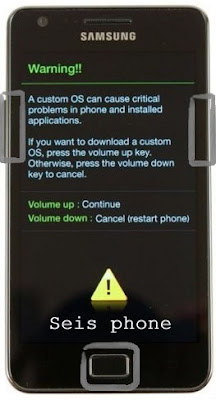
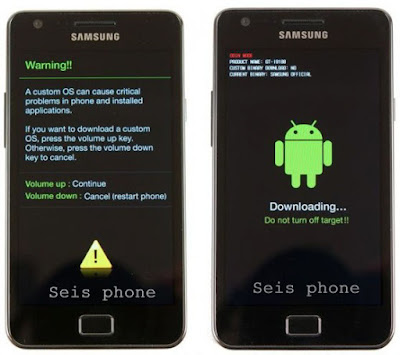
Step 4: Now, you have to boot into "Download mode". To boot into Download Mode: Press and Hold "Volume Down" Key "Home" Key and "Power Key". When phone vibrates Leave the Power Key but Keep holding the "Volume Down" Key and "Home" key. You will boot into the "Download Mode".


Step 5: In the Download mode you will be able to see a Warning Yellow Triangle Sign. In this situation you have to press the "Volume up" key to "continue".

Step 6: Download and extract Odin on your computer. After extracting you will be able to see the following files Odin.exe and Click "instal Odin.exe":

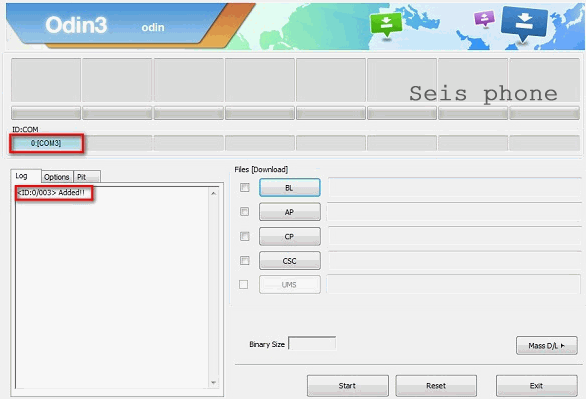
Step 7: Now, Open Odin3 and connect your phone to the computer.

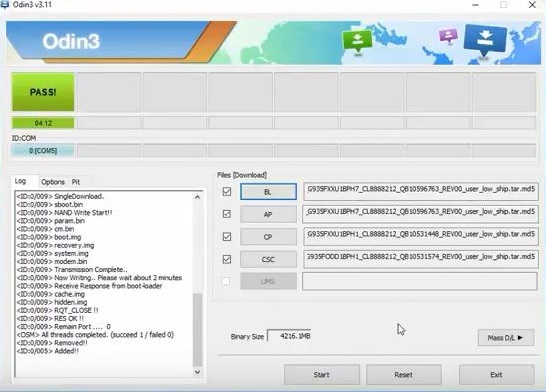
Step 8: Once you have connected the phone to the computer, Odin will automatically recognize the device and show “Added” message at the lower-left panel.


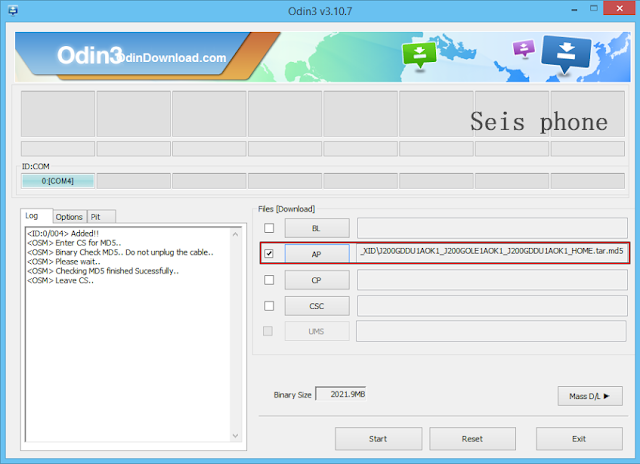
Step 9: Once your device detected by Odin, click on the “PDA” button and select the "tar.md5" file that you have extracted in Step #2.


Step 10: Now, click on the “Start” button in Odin to begin the Flashing process.

Step 11: Once you see, the "Green" Pass Message then remove the USB cable from the device (during this process, your device will restart automatically)


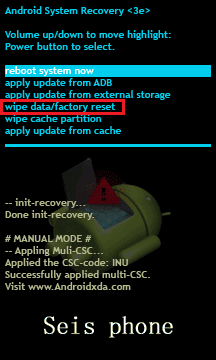
Step 12: Your Samsung Device will now stuck at boot (boot loop). Now and, You have to boot into Stock Recovery Mode, To Enable Stock"Recovery mode":Press and Hold "Volume UP" key"Home" Key, "Power" Key. When phone vibrates Leave the "Power "Key but Keep holding the "Volume UP" Key and "Home" key. You will boot into the Recovery Mode.


Step 13: In Recovery Mode, Click "Wipe Data/factory reset".


Step 14: Once Cache Data is cleared, Select Restart Phone Now from the recovery menu.


Readme Once:

[*] Data Loss Process: Flashing Stock ROM is always a data loss procedure. So, always take backup of your personal data before flashing the Stock ROM.

[*] Flashing Stock ROM or Downgrading Stock ROM does not void your Phone warranty. So, dont worry about the device warranty.

[*] Samsung Stock Firmware: If you are looking for the original firmware for your device then head over to Download Samsung Stock Firmware for all devices page.

[*] Samsung USB Driver: If you are looking for the original USB Driver for your device then head over to Download Samsung USB Driver for all devices page.


Flashing stock ROM can do us many favors: fix system crash, unstable apps, device stuck at logo, bring the device back to unrooted statue And there are more reasons you may want to flash ROM of an Android phone.thanks you

How to Flash and repair Samsung Galaxy S5 SM-G900F

How to Flash and repair Samsung Galaxy S5 SM-G900F

How to Flash and repair Samsung Galaxy S5 SM-G900F using Odin with ease - Before we start our tutorial on using Samsung Odin and installing a Samsung firmware update,I’d like to take a moment and talk to you about phone unlocking. If you’re already rooting your device and looking into installing the new firmware, consider unlocking your device first – once your phone’s rooted, it cannot be unlocked. So it’s the best time to do it, it time takes minutes. Check out our phone unlocking service now.

Samsung Galaxy S5 SM-G900F

IMPORTANT! Installing Samsung firmware using Odin software is not the official way to do it.This method is used only if you want to unroot or reinstall an official firmware in case you’re using a Custom ROM. Odin can also be used if you want to install another country’s firmware on your device. You should always be careful that the firmware you have flashed is for your model precisely. We cannot be held responsible for any damage that your device might incur, please proceed at your own risk. If you need help on how to use Odin or a second opinion, check out the Update forum first.Is your Samsung phone shutting off unexpectedly, crashing apps, or acting buggy? If you want to fix these problems, it may be time for a Samsung firmware update. Just like getting an oil change or tire rotation, updating the firmware on your phone can help it run smoothly and more efficiently.However, the biggest problem with OTA updates for Android devices, in general, is that they are incremental, which means that not all devices receive the update right away. Even if you have the latest Galaxy S8 in your possession, your region and network carrier determine when you receive the next awesome Samsung firmware update.

Since most of us don’t have the patience needed to receive the standard OTA update, there is a way to get past the waiting line with Samsung Odin. By using Update Firmware Platform as your source of verified Samsung firmware download and Odin software to flash it, you can always stay ahead of the curve when it comes to keeping your phone up to date.Let’s take a look at how you can use Odin to update your Samsung firmware or repair smartphone.

Odin is a firmware flashing software developed and internally used by Samsung.It is believed that instead of released by Samsung officially, the tool is leaked accidently. And thanks to the leak, this effective tool is now widely used by Samsung users to flash firmware, recoveries, bootloader, or modem files on Samsung Galaxy device. This tutorial is going to show you the process of flashing Samsung stock/official ROM via Odin.

Process Flashing :


Step 1: Download and install Samsung USB Driver or Download and instal Samsung kies on your computer.( if case you have already installed the Samsung USB Driver on your computer then Skip this step).

Step 2: Download (Stock ROM compatible with your device or if you have already downloaded the firmware then ignore downloading it again) and extract it on your computer. After extracting you will be to see kind of files "MD5".

Step 3: Power Off your Samsung Device.

Step 4: Now, you have to boot into "Download mode". To boot into Download Mode: Press and Hold "Volume Down" Key "Home" Key and "Power Key". When phone vibrates Leave the Power Key but Keep holding the "Volume Down" Key and "Home" key. You will boot into the "Download Mode".


Step 5: In the Download mode you will be able to see a Warning Yellow Triangle Sign. In this situation you have to press the "Volume up" key to "continue".

Step 6: Download and extract Odin on your computer. After extracting you will be able to see the following files Odin.exe and Click "instal Odin.exe":

Step 7: Now, Open Odin3 and connect your phone to the computer.

Step 8: Once you have connected the phone to the computer, Odin will automatically recognize the device and show “Added” message at the lower-left panel.


Step 9: Once your device detected by Odin, click on the “PDA” button and select the "tar.md5" file that you have extracted in Step #2.


Step 10: Now, click on the “Start” button in Odin to begin the Flashing process.

Step 11: Once you see, the "Green" Pass Message then remove the USB cable from the device (during this process, your device will restart automatically)


Step 12: Your Samsung Device will now stuck at boot (boot loop). Now and, You have to boot into Stock Recovery Mode, To Enable Stock"Recovery mode":Press and Hold "Volume UP" key"Home" Key, "Power" Key. When phone vibrates Leave the "Power "Key but Keep holding the "Volume UP" Key and "Home" key. You will boot into the Recovery Mode.


Step 13: In Recovery Mode, Click "Wipe Data/factory reset".


Step 14: Once Cache Data is cleared, Select Restart Phone Now from the recovery menu.


Readme Once:

[*] Data Loss Process: Flashing Stock ROM is always a data loss procedure. So, always take backup of your personal data before flashing the Stock ROM.

[*] Flashing Stock ROM or Downgrading Stock ROM does not void your Phone warranty. So, dont worry about the device warranty.

[*] Samsung Stock Firmware: If you are looking for the original firmware for your device then head over to Download Samsung Stock Firmware for all devices page.

[*] Samsung USB Driver: If you are looking for the original USB Driver for your device then head over to Download Samsung USB Driver for all devices page.


Flashing stock ROM can do us many favors: fix system crash, unstable apps, device stuck at logo, bring the device back to unrooted statue And there are more reasons you may want to flash ROM of an Android phone.thanks you

How to Flash and repair Samsung Galaxy S5 SM-G900FD

How to Flash and repair Samsung Galaxy S5 SM-G900FD

How to Flash and repair Samsung Galaxy S5 SM-G900FD using Odin with ease - Before we start our tutorial on using Samsung Odin and installing a Samsung firmware update,I’d like to take a moment and talk to you about phone unlocking. If you’re already rooting your device and looking into installing the new firmware, consider unlocking your device first – once your phone’s rooted, it cannot be unlocked. So it’s the best time to do it, it time takes minutes. Check out our phone unlocking service now.

 Samsung Galaxy S5 SM-G900FD

IMPORTANT! Installing Samsung firmware using Odin software is not the official way to do it.This method is used only if you want to unroot or reinstall an official firmware in case you’re using a Custom ROM. Odin can also be used if you want to install another country’s firmware on your device. You should always be careful that the firmware you have flashed is for your model precisely. We cannot be held responsible for any damage that your device might incur, please proceed at your own risk. If you need help on how to use Odin or a second opinion, check out the Update forum first.Is your Samsung phone shutting off unexpectedly, crashing apps, or acting buggy? If you want to fix these problems, it may be time for a Samsung firmware update. Just like getting an oil change or tire rotation, updating the firmware on your phone can help it run smoothly and more efficiently.However, the biggest problem with OTA updates for Android devices, in general, is that they are incremental, which means that not all devices receive the update right away. Even if you have the latest Galaxy S8 in your possession, your region and network carrier determine when you receive the next awesome Samsung firmware update.

Since most of us don’t have the patience needed to receive the standard OTA update, there is a way to get past the waiting line with Samsung Odin. By using Update Firmware Platform as your source of verified Samsung firmware download and Odin software to flash it, you can always stay ahead of the curve when it comes to keeping your phone up to date.Let’s take a look at how you can use Odin to update your Samsung firmware or repair smartphone.

Odin is a firmware flashing software developed and internally used by Samsung.It is believed that instead of released by Samsung officially, the tool is leaked accidently. And thanks to the leak, this effective tool is now widely used by Samsung users to flash firmware, recoveries, bootloader, or modem files on Samsung Galaxy device. This tutorial is going to show you the process of flashing Samsung stock/official ROM via Odin.

Process Flashing :


Step 1: Download and install Samsung USB Driver or Download and instal Samsung kies on your computer.( if case you have already installed the Samsung USB Driver on your computer then Skip this step).

Step 2: Download (Stock ROM compatible with your device or if you have already downloaded the firmware then ignore downloading it again) and extract it on your computer. After extracting you will be to see kind of files "MD5".

Step 3: Power Off your Samsung Device.

Step 4: Now, you have to boot into "Download mode". To boot into Download Mode: Press and Hold "Volume Down" Key "Home" Key and "Power Key". When phone vibrates Leave the Power Key but Keep holding the "Volume Down" Key and "Home" key. You will boot into the "Download Mode".


Step 5: In the Download mode you will be able to see a Warning Yellow Triangle Sign. In this situation you have to press the "Volume up" key to "continue".

Step 6: Download and extract Odin on your computer. After extracting you will be able to see the following files Odin.exe and Click "instal Odin.exe":

Step 7: Now, Open Odin3 and connect your phone to the computer.

Step 8: Once you have connected the phone to the computer, Odin will automatically recognize the device and show “Added” message at the lower-left panel.


Step 9: Once your device detected by Odin, click on the “PDA” button and select the "tar.md5" file that you have extracted in Step #2.


Step 10: Now, click on the “Start” button in Odin to begin the Flashing process.

Step 11: Once you see, the "Green" Pass Message then remove the USB cable from the device (during this process, your device will restart automatically)


Step 12: Your Samsung Device will now stuck at boot (boot loop). Now and, You have to boot into Stock Recovery Mode, To Enable Stock"Recovery mode":Press and Hold "Volume UP" key"Home" Key, "Power" Key. When phone vibrates Leave the "Power "Key but Keep holding the "Volume UP" Key and "Home" key. You will boot into the Recovery Mode.


Step 13: In Recovery Mode, Click "Wipe Data/factory reset".


Step 14: Once Cache Data is cleared, Select Restart Phone Now from the recovery menu.


Readme Once:

[*] Data Loss Process: Flashing Stock ROM is always a data loss procedure. So, always take backup of your personal data before flashing the Stock ROM.

[*] Flashing Stock ROM or Downgrading Stock ROM does not void your Phone warranty. So, dont worry about the device warranty.

[*] Samsung Stock Firmware: If you are looking for the original firmware for your device then head over to Download Samsung Stock Firmware for all devices page.

[*] Samsung USB Driver: If you are looking for the original USB Driver for your device then head over to Download Samsung USB Driver for all devices page.


Flashing stock ROM can do us many favors: fix system crash, unstable apps, device stuck at logo, bring the device back to unrooted statue And there are more reasons you may want to flash ROM of an Android phone.thanks you